
You uploaded a new WordPress theme zip through your admin dashboard, clicked install, and ran straight into this roadblock: “The package could not be installed. The theme is missing the style.css stylesheet. Theme installation failed.”
This happens for two main reasons: WordPress ran into an unexpected folder structure inside that zip, or your main stylesheet header is missing the metadata comments WordPress needs to identify the theme. Here is how to inspect your theme folder, unpack nested archives, verify the required CSS headers, and get the theme installed without wasting time.
Why WordPress Throws the style.css Error
When you upload a theme zip via Appearance > Themes > Add New > Upload Theme, WordPress unzips everything directly into wp-content/themes/ and immediately scans the top level of that extracted folder for style.css.
If that file isn’t sitting right in the theme’s root directory, the installer bails. The usual suspects:
- Nested zip archives: You uploaded the full bundle downloaded from marketplaces like Envato or ThemeForest instead of just the installable theme archive.
- Subfolder nesting: The extracted folder wraps the actual theme inside an extra parent folder before reaching
style.css. - Missing stylesheet headers:
style.cssis there, but it lacks the mandatory WordPress header comment block. - Plugin uploaded as a theme: You accidentally tried uploading a plugin zip through the theme installer.
If you’re dealing with a marketplace bundle, check our guide on how to install an Envato WordPress theme and import demo content so you don’t fight unnecessary documentation files.
Extract and Find the Real Installable Zip
By far the most common cause is uploading the full marketplace package. When you download a theme purchase, it often bundles child themes, PSD files, licensing text, plugins, and PDF documentation into one big archive.
Extract the downloaded zip on your machine first to check what’s inside.
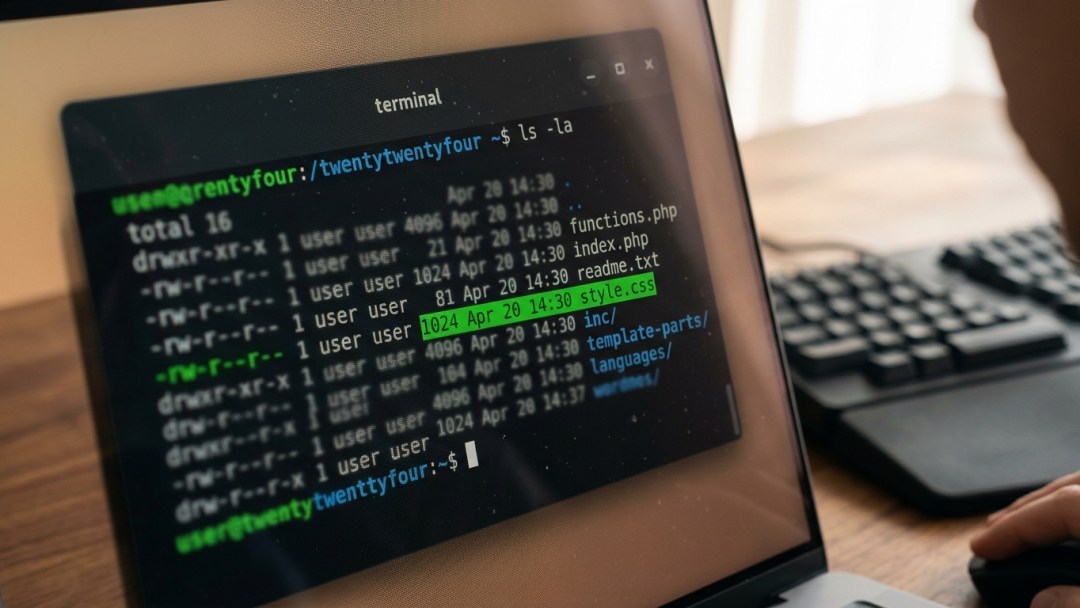
Here is what I run in the terminal to inspect an archive before uploading:
# Unzip the downloaded bundle into a temporary folder
unzip themeforest-package-bundle.zip -d ./theme-bundle/ # List the contents of the bundle
ls -la ./theme-bundle/
Inside ./theme-bundle/, look for a sub-archive named something like yourtheme.zip or yourtheme-installable.zip. That smaller zip (usually 2MB to 15MB) is the actual file WordPress expects.
If you see folders named Documentation, Licensing, and Plugins sitting next to a zip file, upload only that internal zip to WordPress.
Inspect the Extracted Directory Structure
If you built a custom theme or zipped it up manually on macOS or Linux, it’s easy to accidentally nest folders. WordPress needs style.css and index.php (or templates/index.html for block themes) right at the top level of the theme folder.
This directory structure will fail every time:
my-custom-theme.zip
└── my-custom-theme/ └── my-custom-theme-files/ ├── style.css └── index.php
This structure is clean and installs without issues:
my-custom-theme.zip
└── my-custom-theme/ ├── functions.php ├── index.php ├── screenshot.png └── style.css
To zip up your theme directory from the terminal without dragging along system junk like .DS_Store, navigate into the parent directory and run:
# Clean zip creation excluding macOS hidden files
zip -r -X my-custom-theme.zip my-custom-theme/ -x "*.DS_Store" "*__MACOSX*"
Before putting new themes into production, make sure you audit code quality—see our guide on how to audit a ThemeForest WordPress theme.
Verify the style.css Header Comment Block
Even when style.css is sitting in the right directory, WordPress will reject the theme if the header comment block is missing or broken. WordPress parses the first 8KB of style.css with regex to grab metadata like the theme name and version.
Open style.css in your editor and check that it starts with a standard header comment block:
/*
Theme Name: Custom Production Theme
Theme URI: https://example.com/custom-theme
Author: Dev Team
Author URI: https://example.com
Description: Production custom theme for high-traffic WordPress setups.
Version: 1.0.0
Requires at least: 6.2
Tested up to: 6.4
Requires PHP: 8.1
License: GNU General Public License v2 or later
License URI: http://www.gnu.org/licenses/gpl-2.0.html
Text Domain: custom-theme
*/ /* Reset and base styles follow below */
*, *::before, *::after { box-sizing: border-box;
}
At bare minimum, the Theme Name: line is required. If your stylesheet was pre-minified or has CSS rules appearing before the comment block, WordPress won’t detect the metadata.
For child themes, you also need the Template: directive pointing to the directory name of the parent theme:
/*
Theme Name: Custom Child Theme
Theme URI: https://example.com/custom-child
Template: parent-theme-slug
Author: Dev Team
Version: 1.0.0
Text Domain: custom-child-theme
*/
Check the WordPress Developer Documentation for style.css if you need the full list of supported header fields.
Upload the Theme Directly via FTP or SSH
If the admin dashboard upload keeps failing because of PHP file size limits or server timeouts, upload the theme directory straight to the server over SSH or SFTP.
If you hit upload issues, check your PHP config or see our troubleshooting guide for the upload failed to write file to disk error in WordPress.
To push the folder via SSH using rsync:
# Upload unzipped theme folder directly to wp-content/themes/
scp -r ./my-custom-theme user@server_ip:/var/www/html/wp-content/themes/
# Fix permissions on the newly uploaded directory
ssh user@server_ip "chown -R www-data:www-data /var/www/html/wp-content/themes/my-custom-theme && chmod -R 755 /var/www/html/wp-content/themes/my-custom-theme"
Once the upload finishes, head to Appearance > Themes in your dashboard. WordPress will automatically pick up the new theme if style.css is in place with valid headers.
Install and Activate via WP-CLI
If you have SSH access, skip the admin UI entirely and use WP-CLI. It gives you clear, immediate terminal output if an archive fails validation.
Run these from your WordPress root:
# Install theme from a local zip file
wp theme install /path/to/my-custom-theme.zip # If the theme is already unzipped inside wp-content/themes/
wp theme list # Activate the theme
wp theme activate my-custom-theme
If the archive is missing style.css, WP-CLI outputs the exact path where the failure occurred, making nested folders immediately obvious.
Troubleshooting Edge Cases
If you verified the directory layout and style.css headers but still hit errors, check these edge cases:
- File casing: Linux filesystems are case-sensitive. The file must be named
style.cssin all lowercase. If it’s namedStyle.cssorSTYLE.CSS, your web server might serve it, but WordPress core checks will fail on Linux. - File encoding: Save
style.cssas UTF-8 without Byte Order Mark (BOM). A UTF-8 BOM inserts invisible bytes at the start of the file, breaking the regex parser inwp-admin/includes/theme.php. - Missing index file: Even with a valid
style.css, classic themes requireindex.phpand block themes requiretemplates/index.html. Missing both means WordPress marks the theme as broken. - Server temporary directory full: When extracting archives, PHP writes to
/tmp. If the server disk is full, extraction silently truncates and drops files.
Frequently Asked Questions
Why did I get this error when installing an Envato/ThemeForest theme?
When you click “Download All Files & Documentation” on ThemeForest, you get a bundle containing manuals, license files, and assets. In your ThemeForest account, click Download and select Installable WordPress file only instead.
Can I just create an empty style.css file to bypass the error?
No. An empty style.css clears the missing file check, but WordPress will mark the theme broken unless it finds at least the Theme Name: header comment inside.
Does this error apply to block themes (Full Site Editing)?
Yes. Block themes still require a root style.css with theme header metadata. Even though styles are defined in theme.json, WordPress uses style.css as the identity manifest for the theme.
Next Steps
Once your theme is installed and active, test how it performs under load by following our guide on how to test WordPress theme bloat and performance.
